

• Products
    • Control
      • Controller Hub
      • Application controller Pro 3
      • Application controller
      • Wireless application controller
      • Room control
      • Lighting Control Module
      • Blind control
      • Somfy blind control
      • Switches
      • Switch Hub
      • Smart switch touch
      • Smart switch rotary
      • Smart switch
      • Smart touch display
      • Scenepanel switches
    • Relay
      • Relay Hub
      • 4 Channel DALI relay + I/O
      • Smart relay controller
      • Smart fan controller
      • Smart blind controller
      • DALI relay
      • Smart IO
      • Sensors
      • Sensor Hub
      • Smart sensors
      • Air quality sensors
      • Thermal sensors
      • Weatherproof sensors
    • Drivers / Controllers
      • Smart driver
      • Wireless bridge
      • Smart PWM Controllers
      • DALI power supply
      • DALI-2 power supply
      • DALI power supply
      • Emergency
      • Emergency converter
      • Wireless emergency
      • Ektor emergency
      • —
      • All products
      • Product Datasheets
  • System
    • zencontrol system
      • Architecture overview
      • Size and architecture
      • Security
      • System resilience
      • Modern lighting control
      • Emergency testing
      • User access control
      • Plan view
      • Grid view
    • System layers
      • Software
      • Network
      • Control
      • Field
      • The Cloud
      • Cloud Hub
      • Plan view
      • Analytics
      • Power Dashboard
      • Customisable Dashboards
    • Integration
      • Integration Hub
      • DMX
      • MQTT
      • BACnet
      • DALI-2
      • Emergency testing
      • Control4
    • Standalone Hub
      • Standalone Hub
      • zencontrol connect
      • Standalone control (GEN 1)
      • Standalone Lighting Applications
      • Software & Apps
      • Software Hub
      • Switch 2 Application
    • Solutions
      • Wireless lighting control
      • Wellbeing
      • Human centric lighting
      • Smart buildings
      • Complex tasks
      • Learn about DALI
  • Support
    • FAQs & support
    • Downloads
    •   —
    • About us
    • About DALI
    •   —
    • Become a solutions provider
    • Become a distributor
    • Unrivalled support
  • News
  • Contact
    • Distributors
    • Solutions providers
  • Sign in
  • Products
    • Control
      • Controller Hub
      • Application controller Pro 3
      • Application controller
      • Wireless application controller
      • Room control
      • Lighting Control Module
      • Blind control
      • Somfy blind control
      • Switches
      • Switch Hub
      • Smart switch touch
      • Smart switch rotary
      • Smart switch
      • Smart touch display
      • Scenepanel switches
    • Relay
      • Relay Hub
      • 4 Channel DALI relay + I/O
      • Smart relay controller
      • Smart fan controller
      • Smart blind controller
      • DALI relay
      • Smart IO
      • Sensors
      • Sensor Hub
      • Smart sensors
      • Air quality sensors
      • Thermal sensors
      • Weatherproof sensors
    • Drivers / Controllers
      • Smart driver
      • Wireless bridge
      • Smart PWM Controllers
      • DALI power supply
      • DALI-2 power supply
      • DALI power supply
      • Emergency
      • Emergency converter
      • Wireless emergency
      • Ektor emergency
      • —
      • All products
      • Product Datasheets
  • System
    • zencontrol system
      • Architecture overview
      • Size and architecture
      • Security
      • System resilience
      • Modern lighting control
      • Emergency testing
      • User access control
      • Plan view
      • Grid view
    • System layers
      • Software
      • Network
      • Control
      • Field
      • The Cloud
      • Cloud Hub
      • Plan view
      • Analytics
      • Power Dashboard
      • Customisable Dashboards
    • Integration
      • Integration Hub
      • DMX
      • MQTT
      • BACnet
      • DALI-2
      • Emergency testing
      • Control4
    • Standalone Hub
      • Standalone Hub
      • zencontrol connect
      • Standalone control (GEN 1)
      • Standalone Lighting Applications
      • Software & Apps
      • Software Hub
      • Switch 2 Application
    • Solutions
      • Wireless lighting control
      • Wellbeing
      • Human centric lighting
      • Smart buildings
      • Complex tasks
      • Learn about DALI
  • Support
    • FAQs & support
    • Downloads
    •   —
    • About us
    • About DALI
    •   —
    • Become a solutions provider
    • Become a distributor
    • Unrivalled support
  • News
  • Contact
    • Distributors
    • Solutions providers
  • Sign in
  • Learn about DALI
    • Why choose DALI?
    • DALI features & information
    • DALI installation requirements
    • DALI-2
    • DALI scenes & groups
    • GTIN / Serial numbers
    • Addressing
    • Safety lighting
    • DALI speed
    • DALI applications
    • DALI memory
    • DALI for buildings
    • DALI for electricians
    • DALI for consultants
    • DALI for installers
    • DALI emergency: What & why
    • DALI emergency: Features
    • DALI emergency: As a standalone solution

Digital transmission

DALI employs a digital transmission signal which makes it less prone to the transmission errors that typically affect analogue control signals. Unlike the older 1-10v analogue systems or the propriety DSI systems the DALI signal allows for Bi-Directional Communication which creates the ability to obtain functionality results directly from the DALI device.

Simple DALI line

Below you can see DALI devices, these can be ballasts, transformers, LED controllers or emergency devices compatible with DALI. Up to 64 DALI devices can be connected to a line. Sensors, switches, groups or scene controllers can be connected anywhere on the DALI line. These are optional devices. A DALI power supply is required for every DALI loop and a DALI controller, or gateway, allows control of a DALI line. The DALI protocol allows for multiple controllers per DALI loop. Also these devices are optional.

Click to resize

  • DALI features & information

HINT: Mains Power refers to the active neutral and earth wires.

DALI wiring refers to the two cables used for the DALI signal. These wires are 240V rated and can be run next to the mains power cables

Individual control

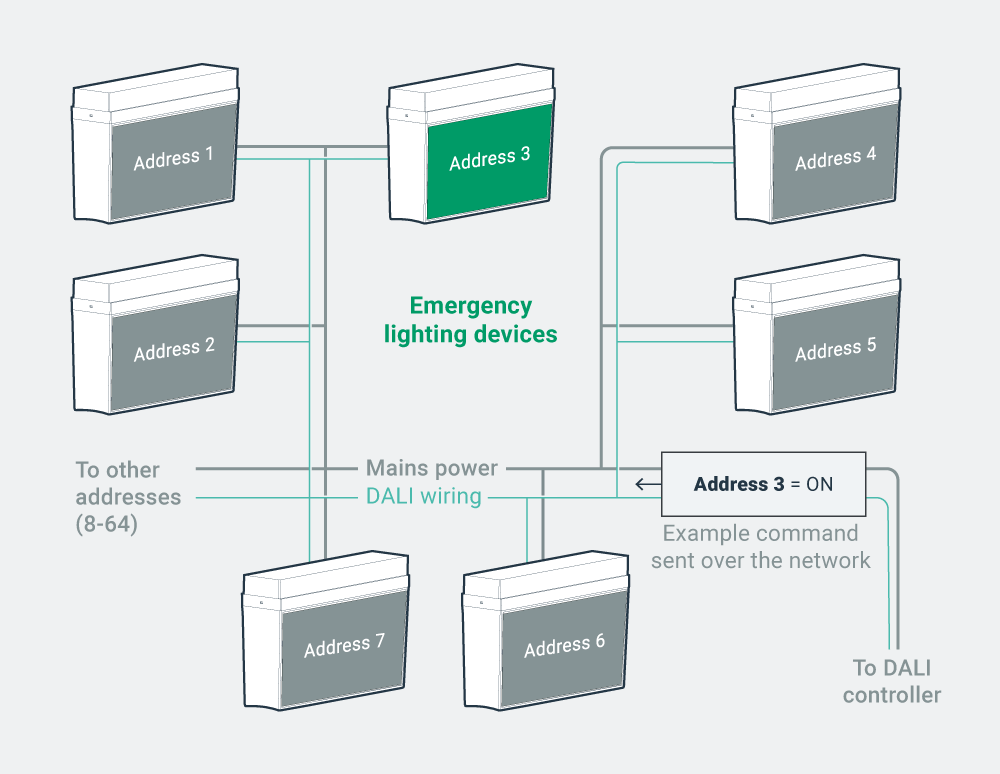
Each DALI device has its own address which enables individual communication and control over a single DALI line. This means that you can wire up to 64 DALI devices together and control them separately, whereas traditionally you would need to wire each device separately. Individual control provides the means to gain the maximum power savings and comfort.

Click to resize

  • DALI features & information

HINT: Think of a command as a letter sent via the post. Only the person it is addressed to will open and read the letter.

Feedback & control

Individual control is exploited through a broad range of queries/commands, listed below. The feedback from the device provides the perfect method for minimizing maintenance costs of the building while ensuring a safe working environment.

  • Turn on/off
  • Dim up/down
  • Lamp status (faulty, working, running hours)
  • DALI Device Status
  • Set features such as Power-on-level and System-Failure-level

Functionality & flexibility

Because of the localised intelligence within each DALI device, it becomes possible to turn the DALI device on or off directly from the DALI control system rather than using a mains switch. This brings greater functionality and allows for flexibility and change after installation.

Moreover, changes can be made to scenes and functions through simple programming without the addition of any new hardware.

Adjustable features

DALI devices have a number of features that can be changed to adjust the operation of the device, per example:

  • Power on Level: 1-100%
  • System Fail Level: 0-100%
  • Minimum Level: Physical Min Level -100%
  • Maximum Level: Min Level – 100%
  • Fade Rate: 1-15
  • Fade Time: 1-15

DALI features & information

Control your building through the Cloud.

Cut and paste settings across floors, buildings or sites. It has never been quicker or easier.

Learn more
Why Choose DALI?
DALI installation requirements
Scroll
Recent news
  • Guangzhou International Lighting Exhibition 2026 June 17, 2026
  • Light+Building 8 – 13 March 2026 January 12, 2026
  • Merry Christmas from zencontrol December 8, 2025
  • 2025 Lighting Industry Excellence Awards November 4, 2025
  • Case-study – Nuriyah Cafe June 4, 2025
Cloud sign in

Sign in or register to the Cloud to manage your building with an unprecedented level of control and functionality.

Sign in

Not signed up?

Click here.

Contact

Australia: support@zencontrol.com
Denmark: info@zencontrol.dk
United Kingdom: info@zencontrol.co.uk
India:
solutions@zencontrol.co.in
China:
+86 769 8915 0328-801

Cant find your country?
See all distributors
Become a distributor
Become a Solutions provider

©2024 zencontrol / Terms of use / Privacy policy / Cookie policy / Integration / Software / Cloud / Products / Downloads / All images are for illustrative purposes and are subject to change