

• Products
    • Control
      • Controller Hub
      • Application controller Pro 3
      • Application controller
      • Wireless application controller
      • Room control
      • Lighting Control Module
      • Blind control
      • Somfy blind control
      • Switches
      • Switch Hub
      • Smart switch touch
      • Smart switch rotary
      • Smart switch
      • Smart touch display
      • Scenepanel switches
    • Relay
      • Relay Hub
      • 4 Channel DALI relay + I/O
      • Smart relay controller
      • Smart fan controller
      • Smart blind controller
      • DALI relay
      • Smart IO
      • Sensors
      • Sensor Hub
      • Smart sensors
      • Air quality sensors
      • Thermal sensors
      • Weatherproof sensors
    • Drivers / Controllers
      • Smart driver
      • Wireless bridge
      • Smart PWM Controllers
      • DALI power supply
      • DALI-2 power supply
      • DALI power supply
      • Emergency
      • Emergency converter
      • Wireless emergency
      • Ektor emergency
      • —
      • All products
      • Product Datasheets
  • System
    • zencontrol system
      • Architecture overview
      • Size and architecture
      • Security
      • System resilience
      • Modern lighting control
      • Emergency testing
      • User access control
      • Plan view
      • Grid view
    • System layers
      • Software
      • Network
      • Control
      • Field
      • The Cloud
      • Cloud Hub
      • Plan view
      • Analytics
      • Power Dashboard
      • Customisable Dashboards
    • Integration
      • Integration Hub
      • DMX
      • MQTT
      • BACnet
      • DALI-2
      • Emergency testing
      • Control4
    • Standalone Hub
      • Standalone Hub
      • zencontrol connect
      • Standalone control (GEN 1)
      • Standalone Lighting Applications
      • Software & Apps
      • Software Hub
      • Switch 2 Application
    • Solutions
      • Wireless lighting control
      • Wellbeing
      • Human centric lighting
      • Smart buildings
      • Complex tasks
      • Learn about DALI
  • Support
    • FAQs & support
    • Downloads
    •   —
    • About us
    • About DALI
    •   —
    • Become a solutions provider
    • Become a distributor
    • Unrivalled support
  • News
  • Contact
    • Distributors
    • Solutions providers
  • Sign in
  • Products
    • Control
      • Controller Hub
      • Application controller Pro 3
      • Application controller
      • Wireless application controller
      • Room control
      • Lighting Control Module
      • Blind control
      • Somfy blind control
      • Switches
      • Switch Hub
      • Smart switch touch
      • Smart switch rotary
      • Smart switch
      • Smart touch display
      • Scenepanel switches
    • Relay
      • Relay Hub
      • 4 Channel DALI relay + I/O
      • Smart relay controller
      • Smart fan controller
      • Smart blind controller
      • DALI relay
      • Smart IO
      • Sensors
      • Sensor Hub
      • Smart sensors
      • Air quality sensors
      • Thermal sensors
      • Weatherproof sensors
    • Drivers / Controllers
      • Smart driver
      • Wireless bridge
      • Smart PWM Controllers
      • DALI power supply
      • DALI-2 power supply
      • DALI power supply
      • Emergency
      • Emergency converter
      • Wireless emergency
      • Ektor emergency
      • —
      • All products
      • Product Datasheets
  • System
    • zencontrol system
      • Architecture overview
      • Size and architecture
      • Security
      • System resilience
      • Modern lighting control
      • Emergency testing
      • User access control
      • Plan view
      • Grid view
    • System layers
      • Software
      • Network
      • Control
      • Field
      • The Cloud
      • Cloud Hub
      • Plan view
      • Analytics
      • Power Dashboard
      • Customisable Dashboards
    • Integration
      • Integration Hub
      • DMX
      • MQTT
      • BACnet
      • DALI-2
      • Emergency testing
      • Control4
    • Standalone Hub
      • Standalone Hub
      • zencontrol connect
      • Standalone control (GEN 1)
      • Standalone Lighting Applications
      • Software & Apps
      • Software Hub
      • Switch 2 Application
    • Solutions
      • Wireless lighting control
      • Wellbeing
      • Human centric lighting
      • Smart buildings
      • Complex tasks
      • Learn about DALI
  • Support
    • FAQs & support
    • Downloads
    •   —
    • About us
    • About DALI
    •   —
    • Become a solutions provider
    • Become a distributor
    • Unrivalled support
  • News
  • Contact
    • Distributors
    • Solutions providers
  • Sign in
  • Learn about DALI
    • Why choose DALI?
    • DALI features & information
    • DALI installation requirements
    • DALI-2
    • DALI scenes & groups
    • GTIN / Serial numbers
    • Addressing
    • Safety lighting
    • DALI speed
    • DALI applications
    • DALI memory
    • DALI for buildings
    • DALI for electricians
    • DALI for consultants
    • DALI for installers
    • DALI emergency: What & why
    • DALI emergency: Features
    • DALI emergency: As a standalone solution

Design & layout of a building

As each DALI line is limited to a maximum of 64 devices, it is common that more than one DALI line will be required on each floor. Commonly, floors are broken into a number of different sections containing up to 64 DALI devices. Each section is then wired back to the communications room located on the same floor.
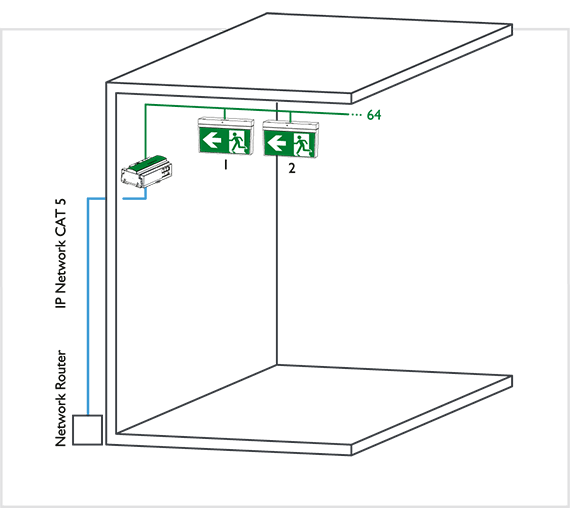
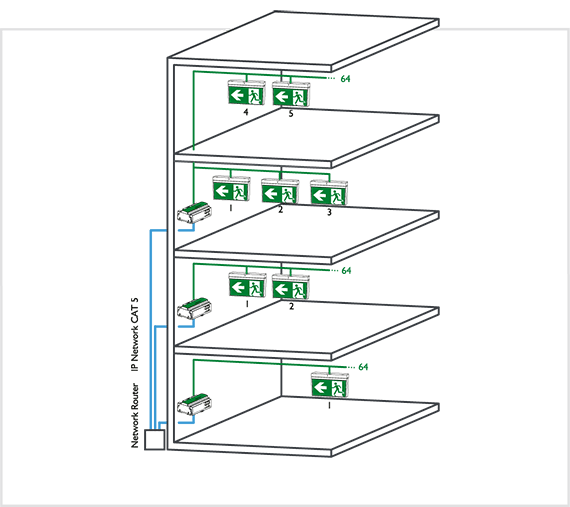
HINT: Try to group physical rooms onto the same DALI line to reduce the complexity of the installation and to allow easier control

As a DALI device is galvanically isolated, each DALI device can be supplied from a different electrical supply circuit or even a different phase. This means that wiring a DALI line does not have to take into account the layout of internal subdivisions.

Typically the DALI control system will have a connection box located on each floor to reduce the required wiring. A connection box will have two separate communication zones, one dedicated to the DALI protocol to talk to all DALI devices on the connected line(s), and the second to use the manufacturer chosen protocol(s) to connect the connection box and the control system together.

HINT: For true DALI compatibility try to choose a control system which allows for other DALI controllers to be placed on the DALI line. This will allow for the greatest capability and can lower the future costs when change occurs, this is referred to as a multi-master DALI system.

Alt Text

DALI line

The DALI Protocol is designed for a small collection of DALI devices, up to 64, on a single line. The DALI devices on the line can be controlled as a group or individually. Only a DALI controller connected to the same line can control the associated DALI devices.

The DALI application controller can satisfy the simple one line installations with the ability to scale up if needed through an ethernet network.  The application controller can control one DALI line of 64 devices + 63 control devices and automatically scans for device changes and assigning DALI short addresses. Great for stairwell and small office installations.

Alt Text

Multiple DALI lines

Because DALI is limited to 64 devices per line, a control system is required to link more than one DALI line together. Depending on the design of the control system, unlimited numbers of DALI lines can be connected together allowing for easy control of building lighting.

Our room controller can control up to 10 rooms (lines), and the controllers can be joined together using an ethernet network to expand the installation.  One room controller  replaces up to 10 lighting control modules usually used in a floor installation. Once the lights, sensors and switches are connected to the room channel, the room controller will automatically comission them to work in their usual configuration. The room control can cater for cross room control with additional commissioning if needed.

NOTE: TCP/IP or Ethernet is Ektor’s preferred choice for connecting multiple DALI lines together, as it is fast, efficient and can even use a shared communication backbone. Preference is given to Ethernet, as the combination of DALI & Ethernet can provide almost every option or control available on other system.

Also these other systems ( like KNX or BACnet) tend to require both DALI and Ethernet to perform the same tasks. Using Ethernet & DALI properly removes the need to wedge a third protocol in between two perfectly suitable and capable systems, and thus reduces complexity and overall cost of the system.

DALI for electricians
Scroll
Recent news
  • Guangzhou International Lighting Exhibition 2026 June 17, 2026
  • Light+Building 8 – 13 March 2026 January 12, 2026
  • Merry Christmas from zencontrol December 8, 2025
  • 2025 Lighting Industry Excellence Awards November 4, 2025
  • Case-study – Nuriyah Cafe June 4, 2025
Cloud sign in

Sign in or register to the Cloud to manage your building with an unprecedented level of control and functionality.

Sign in

Not signed up?

Click here.

Contact

Australia: support@zencontrol.com
Denmark: info@zencontrol.dk
United Kingdom: info@zencontrol.co.uk
India:
solutions@zencontrol.co.in
China:
+86 769 8915 0328-801

Cant find your country?
See all distributors
Become a distributor
Become a Solutions provider

©2024 zencontrol / Terms of use / Privacy policy / Cookie policy / Integration / Software / Cloud / Products / Downloads / All images are for illustrative purposes and are subject to change