

• Products
    • Control
      • Controller Hub
      • Application controller Pro 3
      • Application controller
      • Wireless application controller
      • Room control
      • Lighting Control Module
      • Blind control
      • Somfy blind control
      • Switches
      • Switch Hub
      • Smart switch touch
      • Smart switch rotary
      • Smart switch
      • Smart touch display
      • Scenepanel switches
    • Relay
      • Relay Hub
      • 4 Channel DALI relay + I/O
      • Smart relay controller
      • Smart fan controller
      • Smart blind controller
      • DALI relay
      • Smart IO
      • Sensors
      • Sensor Hub
      • Smart sensors
      • Air quality sensors
      • Thermal sensors
      • Weatherproof sensors
    • Drivers / Controllers
      • Smart driver
      • Wireless bridge
      • Smart PWM Controllers
      • DALI power supply
      • DALI-2 power supply
      • DALI power supply
      • Emergency
      • Emergency converter
      • Wireless emergency
      • Ektor emergency
      • —
      • All products
      • Product Datasheets
  • System
    • zencontrol system
      • Architecture overview
      • Size and architecture
      • Security
      • System resilience
      • Modern lighting control
      • Emergency testing
      • User access control
      • Plan view
      • Grid view
    • System layers
      • Software
      • Network
      • Control
      • Field
      • The Cloud
      • Cloud Hub
      • Plan view
      • Analytics
      • Power Dashboard
      • Customisable Dashboards
    • Integration
      • Integration Hub
      • DMX
      • MQTT
      • BACnet
      • DALI-2
      • Emergency testing
      • Control4
    • Standalone Hub
      • Standalone Hub
      • zencontrol connect
      • Standalone control (GEN 1)
      • Standalone Lighting Applications
      • Software & Apps
      • Software Hub
      • Switch 2 Application
    • Solutions
      • Wireless lighting control
      • Wellbeing
      • Human centric lighting
      • Smart buildings
      • Complex tasks
      • Learn about DALI
  • Support
    • FAQs & support
    • Downloads
    •   —
    • About us
    • About DALI
    •   —
    • Become a solutions provider
    • Become a distributor
    • Unrivalled support
  • News
  • Contact
    • Distributors
    • Solutions providers
  • Sign in
  • Products
    • Control
      • Controller Hub
      • Application controller Pro 3
      • Application controller
      • Wireless application controller
      • Room control
      • Lighting Control Module
      • Blind control
      • Somfy blind control
      • Switches
      • Switch Hub
      • Smart switch touch
      • Smart switch rotary
      • Smart switch
      • Smart touch display
      • Scenepanel switches
    • Relay
      • Relay Hub
      • 4 Channel DALI relay + I/O
      • Smart relay controller
      • Smart fan controller
      • Smart blind controller
      • DALI relay
      • Smart IO
      • Sensors
      • Sensor Hub
      • Smart sensors
      • Air quality sensors
      • Thermal sensors
      • Weatherproof sensors
    • Drivers / Controllers
      • Smart driver
      • Wireless bridge
      • Smart PWM Controllers
      • DALI power supply
      • DALI-2 power supply
      • DALI power supply
      • Emergency
      • Emergency converter
      • Wireless emergency
      • Ektor emergency
      • —
      • All products
      • Product Datasheets
  • System
    • zencontrol system
      • Architecture overview
      • Size and architecture
      • Security
      • System resilience
      • Modern lighting control
      • Emergency testing
      • User access control
      • Plan view
      • Grid view
    • System layers
      • Software
      • Network
      • Control
      • Field
      • The Cloud
      • Cloud Hub
      • Plan view
      • Analytics
      • Power Dashboard
      • Customisable Dashboards
    • Integration
      • Integration Hub
      • DMX
      • MQTT
      • BACnet
      • DALI-2
      • Emergency testing
      • Control4
    • Standalone Hub
      • Standalone Hub
      • zencontrol connect
      • Standalone control (GEN 1)
      • Standalone Lighting Applications
      • Software & Apps
      • Software Hub
      • Switch 2 Application
    • Solutions
      • Wireless lighting control
      • Wellbeing
      • Human centric lighting
      • Smart buildings
      • Complex tasks
      • Learn about DALI
  • Support
    • FAQs & support
    • Downloads
    •   —
    • About us
    • About DALI
    •   —
    • Become a solutions provider
    • Become a distributor
    • Unrivalled support
  • News
  • Contact
    • Distributors
    • Solutions providers
  • Sign in
  • Learn about DALI
    • Why choose DALI?
    • DALI features & information
    • DALI installation requirements
    • DALI-2
    • DALI scenes & groups
    • GTIN / Serial numbers
    • Addressing
    • Safety lighting
    • DALI speed
    • DALI applications
    • DALI memory
    • DALI for buildings
    • DALI for electricians
    • DALI for consultants
    • DALI for installers
    • DALI emergency: What & why
    • DALI emergency: Features
    • DALI emergency: As a standalone solution

Addressing

Addressing of devices on a DALI line is facilitated by triggering a randomisation function on each device to generate a large (3 byte) number. This number is used in conjunction with a block of “special commands” to allow the DALI controller to assign unique DAI short addresses (0-63) to each device on a line. Once the device has a short address, the random addresses are no longer needed and all further communication should occur using the new short address.
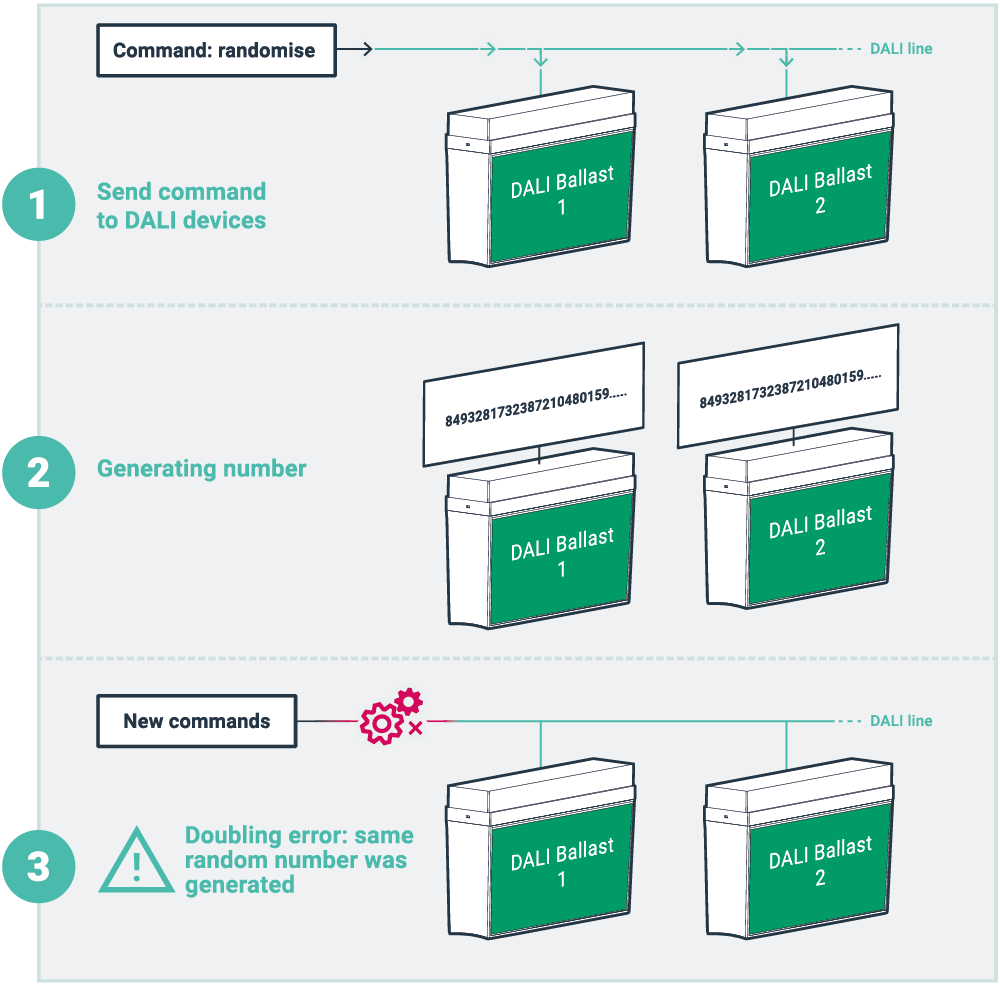
Doubling

The usage of a 3 byte randomisation scheme ensure that whilst it is technically possible for two devices to generate the same number and thus be assigned the same short address, the odds of such an occurrence is extremely unlikely. Should this arise, Ektor offers software with inbuilt routines to isolate and eliminate this issue. Please contact us for more details.

Click to resize

  • Addressing
Automatic Addressing

No more running around, zencontrol room controller address DALI devices automatically and is completed before you even need it.

Add additional fittings at any time knowing they will be addressed and added to the system

HINT: Remember each line has a maximum of 64 devices.

What is the DALI long address?

Some manufactures have renamed “Random address” to the word “Long Address” in an attempt to disguise or rewrite the use of the random address. Random addressing was designed to be used during the commissioning / addressing stage of the project. This feature was only designed to allow a device to be assigned a short address (0-63).


Some manufacturers however, utilise the random address to restore a line if an addressing mistake on the line has occurred. This was not the intention of the feature and complications may arise from such practices.


Listed below are some of the problems for the customer or future contractors from using this practice:

  • No external or non-proprietary tools are supported (even if they are faster, better or easier)
  • Risk of external tools deleting the random address and then costing the customer more money to recommission the line
  • Not truly DALI compatible, as it doesn’t say in the standard not to do this, but being an open standard, anyone’s tools should be able to adjust the line without causing issues with the front end controller.
  • Locked into authorized commissioning agents for the life of the project (not just the contract period)


Overall, it is zencontrol’s thought that these practices should not be used as the manufactures can now use the inbuilt GTIN and Serial numbers to achieve the same result without locking out third party tools

Safety lighting
Scroll
Recent news
  • Guangzhou International Lighting Exhibition 2026 June 17, 2026
  • Light+Building 8 – 13 March 2026 January 12, 2026
  • Merry Christmas from zencontrol December 8, 2025
  • 2025 Lighting Industry Excellence Awards November 4, 2025
  • Case-study – Nuriyah Cafe June 4, 2025
Cloud sign in

Sign in or register to the Cloud to manage your building with an unprecedented level of control and functionality.

Sign in

Not signed up?

Click here.

Contact

Australia: support@zencontrol.com
Denmark: info@zencontrol.dk
United Kingdom: info@zencontrol.co.uk
India:
solutions@zencontrol.co.in
China:
+86 769 8915 0328-801

Cant find your country?
See all distributors
Become a distributor
Become a Solutions provider

©2024 zencontrol / Terms of use / Privacy policy / Cookie policy / Integration / Software / Cloud / Products / Downloads / All images are for illustrative purposes and are subject to change